ShapeMaster User Guide
A property is a user-defined variable (or default) that every shape in the library can access and the end user can modify by using Friendly pages.
It is important that you understand that ShapeMaster deals with shape settings at four levels...
 |
The File menu, as shown above, can also be used to access and customise Properties.
Note: Only users with Developer Software can access the Library Properties (.qil)
A starter catalog (.qim) and a 'Based on' library (.qil) is provided to all users. By default, when loading a library, ShapeMaster looks for a .QIM file as well as a .QIL file, and loads them both together. The difference can be seen when viewing the Library Catalog Manager for the ShapeMaster library.
Only Middleware developers edit the Library Properties. These are overwritten with Catalog properties and together they initialise Drawing properties for a new drawing.
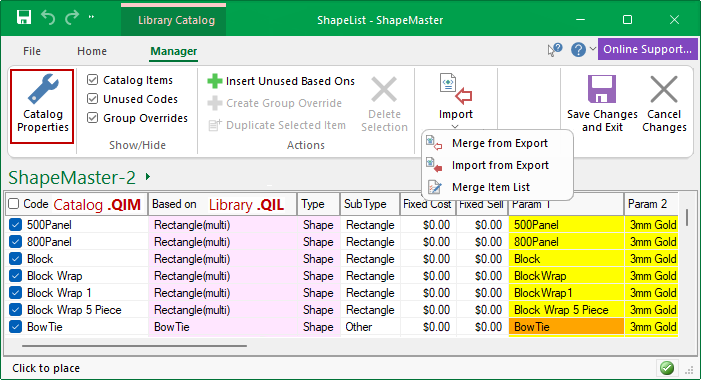
The Catalog allows you to save multiple versions of shapes, each with different settings. Therefore the catalog structure provides a helpful separation of the library design into two levels...
It is therefore possible to have one shape such as a Rectangle and then 6 variations of this, as per above example, 500Panel, 800Panel etc with different default parameters.
The other very useful feature of this separation is that it lets a library designer update the .QIL file(s) slipping in new based on libraries leaving the end user to update the catalog (.QIM) files independently - see note on Insert Unused BasedOns.
Provided the two are kept compatible and the administrative roles are kept separate, this provides a very reliable way of updating libraries in the field, as new construction methods get supported and other features get added to a base library.
Insert Unused BasedOns can be selected from the File menu (shown above) after a library update, to add newly developed shapes to your own customised library (.qim). Library updates are regularly made available to customers with a valid Customer Care Agreement.
See also Library Catalog Manager - Custom Range of Shapes which has a link to a brief tutorial Video.
By default, when loading a library, ShapeMaster looks for a .QIM as well as a .QIL file, and loads them both together.
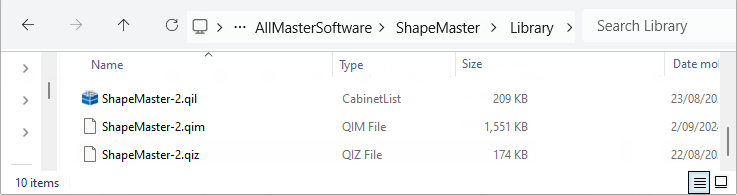
For the following example, we are looking at the library for the ShapeMaster software product. If you select the library ShapeMaster-2, it will load the pair ShapeMaster-2.qil and ShapeMaster-2.qim. The shape image gallery is the .QIZ file. These are found in the .../Library folder but originally distributed files (shown) are kept in a separate folder in case later required.
Example of file location...