
ShapeMaster User Guide
The current version is displayed on the Job Setup > About page of the Drawing Properties.
Access using the Keyboard Shortcut : [F4] or command button located on the Home tab ribbon.
Application Version details are provided on the splash screen when you first open your application or the File > About dialog.
Follow the link for a detailed discussion on How Build Numbers Work.
Why are Drawing Properties not automatically displaying when I first open ShapeMaster?
Each time you open your software, by default, the Drawing Properties are automatically displayed, controlled using the option on the File > Options > General page or the Keyboard Shortcut [F10].
Make sure that this option is turned on (ticked), as shown.
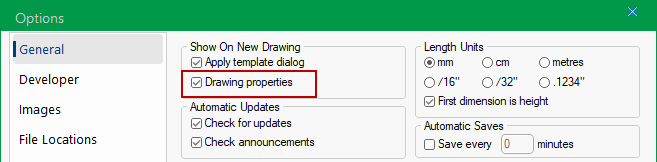
File > Options - Click to view