
ShapeMaster User Guide
How do I make a copy of my library?
Having a good file-management system is important and it is therefore a good practice to make a backup of your working library on a regular basis, and the simplest form of backup is to copy the file. This won't protect it from a hard disk crash (unless it was copied to another drive), but is handy if you make permanent changes that you want to undo.
See topics on Autosave and End Of Day Backup.
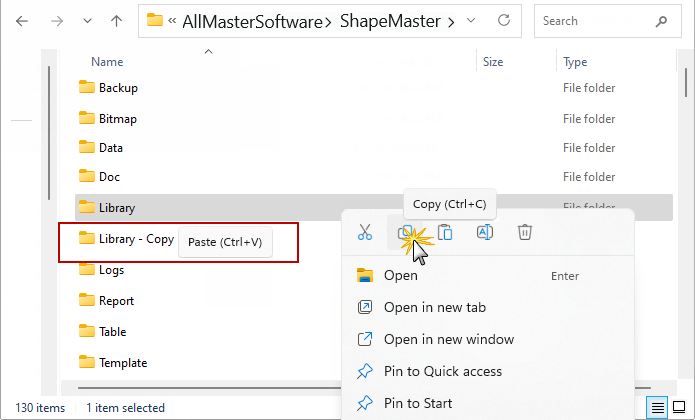
To copy your library, you need to ...
Example
For every library file that you have, there should always be a copy of it in the ShapeMaster Library folder. You should also back up externally.
There are many options in this area, such as removable hard drives, which can vary greatly in cost. The price depends on the capacity of the storage, as well as speed and reliability.
This is largely up to you and your workload. For example, once a week may be acceptable if you are not producing a great deal of work. However, it may be necessary to install an automatic backup system that runs once at the end of every day. It all depends on how much work you are prepared to lose if your hard drive crashes.
For every library file that you have, there should always be a copy of it in the ShapeMaster Library folder. You should also back up externally.
As soon as you make an important change to your library, you should make a copy of it. This is so that if the library becomes corrupted for any reason, you can simple copy the good one back over the invalid one.
The simplest way to do this is to copy the library file, as mentioned above, and then paste it back into the same folder. Instead of copying over itself, it will automatically be renamed to 'Copy of [old filename]'. You can copy a library like this while ShapeMaster is running.
Do not store your backed up material in the same place as the originals, because if there is a theft or fire you will still lose all your work. It is common practice to have backups stored at work in a fireproof safe and/or another copy at the managers home.