
ShapeMaster User Guide
Local Properties are user defined variables that can be referred to in custom machining tables and reports. At the Catalog/Drawing level, Definitions are enabled and named under Setup and (if enabled) default values applied under the Job Details categories, which can be overridden at shape level for individual shapes/items.
This lets you write your own parametric machining table that can have a local property assigned, so you can specify a value such as a dimension or quantity or offset from within the Drawing Properties or at part level.
If these definitions are to be used for future jobs, then it is recommended to set these up in your Catalog. These can be overridden at Shape level.
Custom definitions can be created on the Setup > Local Properties page in the Catalog/Drawing Properties.
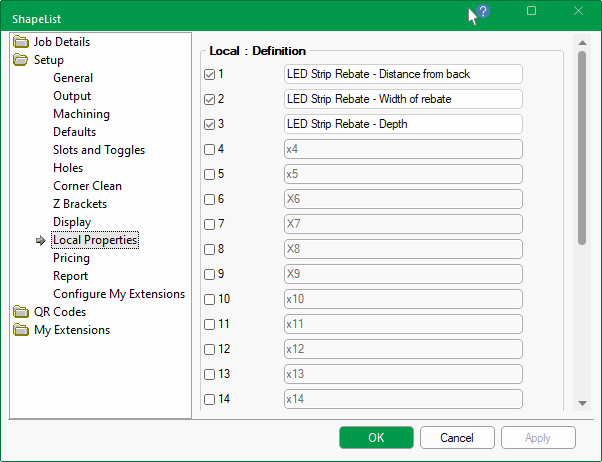
Create up to 25 Definitions by simply ticking a checkbox and typing in a custom heading.
If one or more Definitions are enabled, then an extra page under Job Details (discussed below) is made available to allow default values to be entered/set.
Headings are descriptive only and therefore the values can be referred to by different custom machining tables at Shape level.
An extra page, also called Local Properties (shown below), is added to the JobDetails category only if one or more Definitions are enabled in Setup.
The default values pertaining to the enabled custom Definitions can then ;be manually typed in on the Job Setup > Local Properties page in the Catalog/Drawing Properties.
These defaults can be overridden at Shape level by accessing the Shape Information Properties.

The default values set in the Job Details > Local Properties page, discussed above, will be presented at Shape level.
To access Shape Information click on the button, as shown below, and a Local Properties dialog will be presented with the default values which can be amended here for the individual shape.
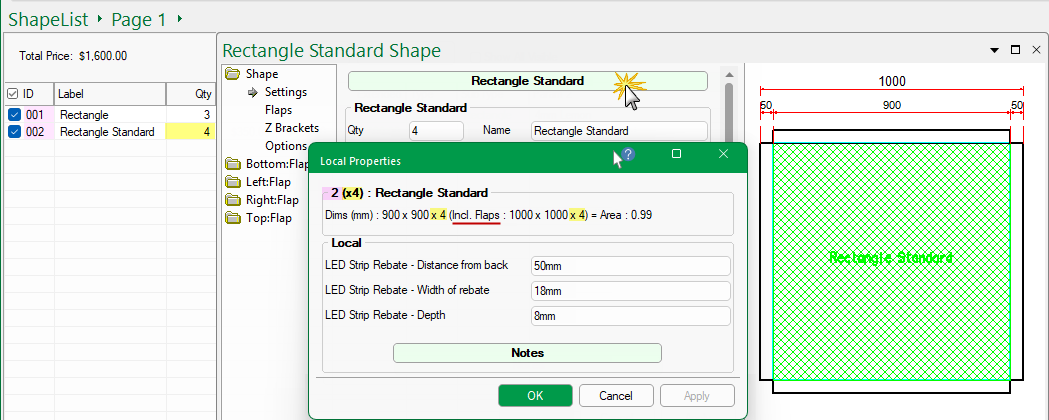
The Shape ID (2), Quantity (x4), Dimensions (mm) with and without Flaps and the Overall Area (sqm).
The Length Units are set in the Options [F10].
![Options [F10]](ShapeMaster/Drawing%20Properties/Report03_thumb.png)
Options [F10]