
ShapeMaster User Guide
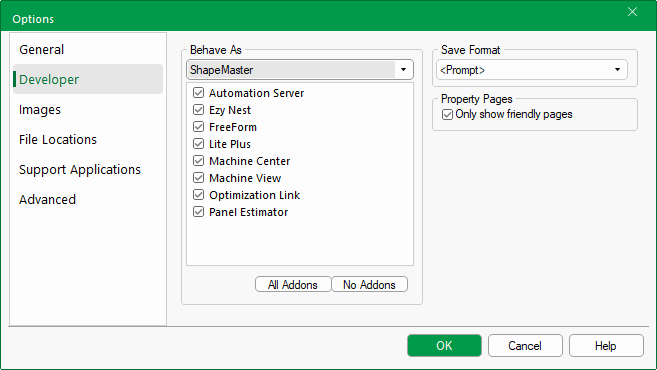 |
This option allows you to change the feature set CabMaster Software™ runs under, allowing you to run your version of CabMaster Software™ as though it is another version of CabMaster Software™ with a cut down set of features. Selecting an option from this drop list will cause your version of CabMaster Software™to behave the same as the version you have selected. The reason you would want to do this is so you can only use what someone running one of the other products can use.
The list of tick box options below enable or disable the different addons associated with the currently selected version of CabMaster Software™.
This option makes it easier to set the default save format when you have multiple products on a lock. You simply use the options in the drop box to preset preferred file save format. You can still get it to if you prefer. The "Standard" format means if you are running ShapeMaster is will save in ShapeMaster format etc. You only ever get prompted or allowed to save in formats that are supported by your product license. For example, a lock with CabMasterPro and ShapeMaster can save in either of those two formats.
Only show Friendly Pages: If this is checked, only custom Friendly Pages will be available from the "Category Tree" on property sheets. This is the default setting.