
ShapeMaster User Guide
A clipboard is a temporary storage area in computer memory that holds data, like text or images, that you've copied or cut. It allows you to move or duplicate that data to another location, either within the same application or to a different one. Essentially, it's a holding place for information while you're working with it.
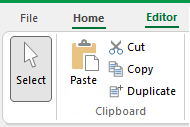 |
To locate information about any part of image above,  click on the area of interest.

Keyboard Shortcut: Ctrl+X
Removes the currently selected object(s) from the drawing and places them on the clipboard, replacing any previous clipboard contents. This allows you to place the objects into other drawings. Cut has the same effect as using the copy command and then deleting the objects. The command is unavailable if there is nothing currently selected.


Keyboard Shortcut: Ctrl+D
Creates an exact copy of any object and places it on the drawing. This is similar to using cut and paste, except that it is slightly faster and does not involve using the clipboard.
The new copy will usually be in exactly the same position as the original, so you may have to move one to see both copies.

Keyboard Shortcut: Ctrl+V
Inserts a copy of the clipboard contents onto the drawing page. Not only can you paste shapes obtained with cut and copy, but other data such as bitmap images and even documents.
Pasting does not affect or delete the contents of the clipboard (allowing you to paste the same object multiple times), and is disabled if the clipboard is empty.